Why Email A/B Testing Transforms Results
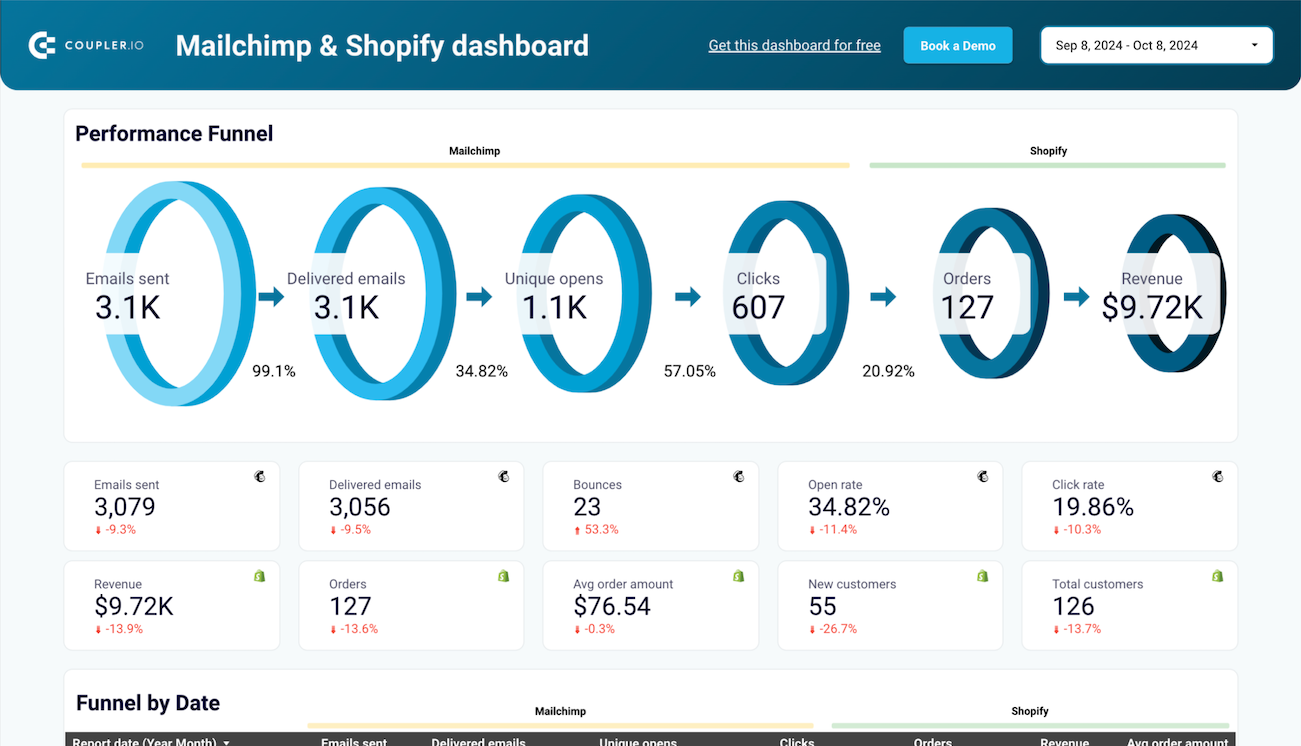
From bustling startups to established global brands, every marketing team faces the same stubborn truth: most emails get ignored. A/B testing gives you proof. Brilliant offers and sharp copy fall short if the subject line misses the mark or the call-to-action lacks punch—your message simply gets buried among the noise. That’s why adopting the Best A/B Testing Practices to Boost Email Open and Click Rates matters more than ever in 2026. Many marketers send their campaigns and hope for the best.
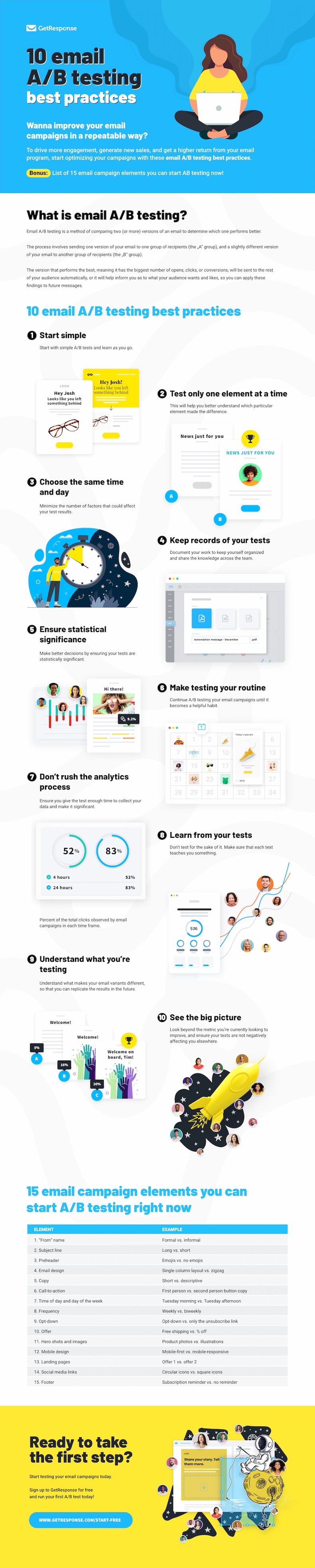
Instead of guessing what works, A/B testing for email campaigns lets teams pit two or more versions of a message against each other in live conditions. The data tells you which subject line grabs more opens, or what button pushes more readers to click through.
You send Version A to half your list and Version B to the other half. Then you measure—open rate, click-through, even revenue per send.
Practicing the Best A/B Testing Practices to Boost Email Open and Click Rates transforms one-off tactics into a real optimization loop. You’re not locked into stale templates or gut feel; you wield clear, repeatable testing methods. Every test, whether on Mailchimp, HubSpot, or ActiveCampaign, gives actionable numbers. Teams that focus on these practices see real gains not just in vanity metrics but in campaign ROI, customer engagement, and long-term list health. Leading email marketers cite industry benchmarks from Statista to set realistic targets, and A/B testing is how they get there.
- Mailchimp — Enables email A/B Testing to directly improve open rates and conversion performance.
- Campaign Monitor — A/B Testing feature enables users to improve email open rates with data-driven experiments.
- HubSpot — Email A/B Testing feature enables targeted experiments to improve email open rates and conversion metrics.
- ActiveCampaign — Includes built-in Email A/B Testing to compare subject lines or content for higher open rates.
- Sendinblue — A/B Testing feature allows testing multiple email elements to improve open rates and conversions.
- Klaviyo — Email A/B Testing feature enables marketers to directly test subject lines, content, and send times to boost open rates.
Step-by-Step Stages of an Effective Email A/B Test
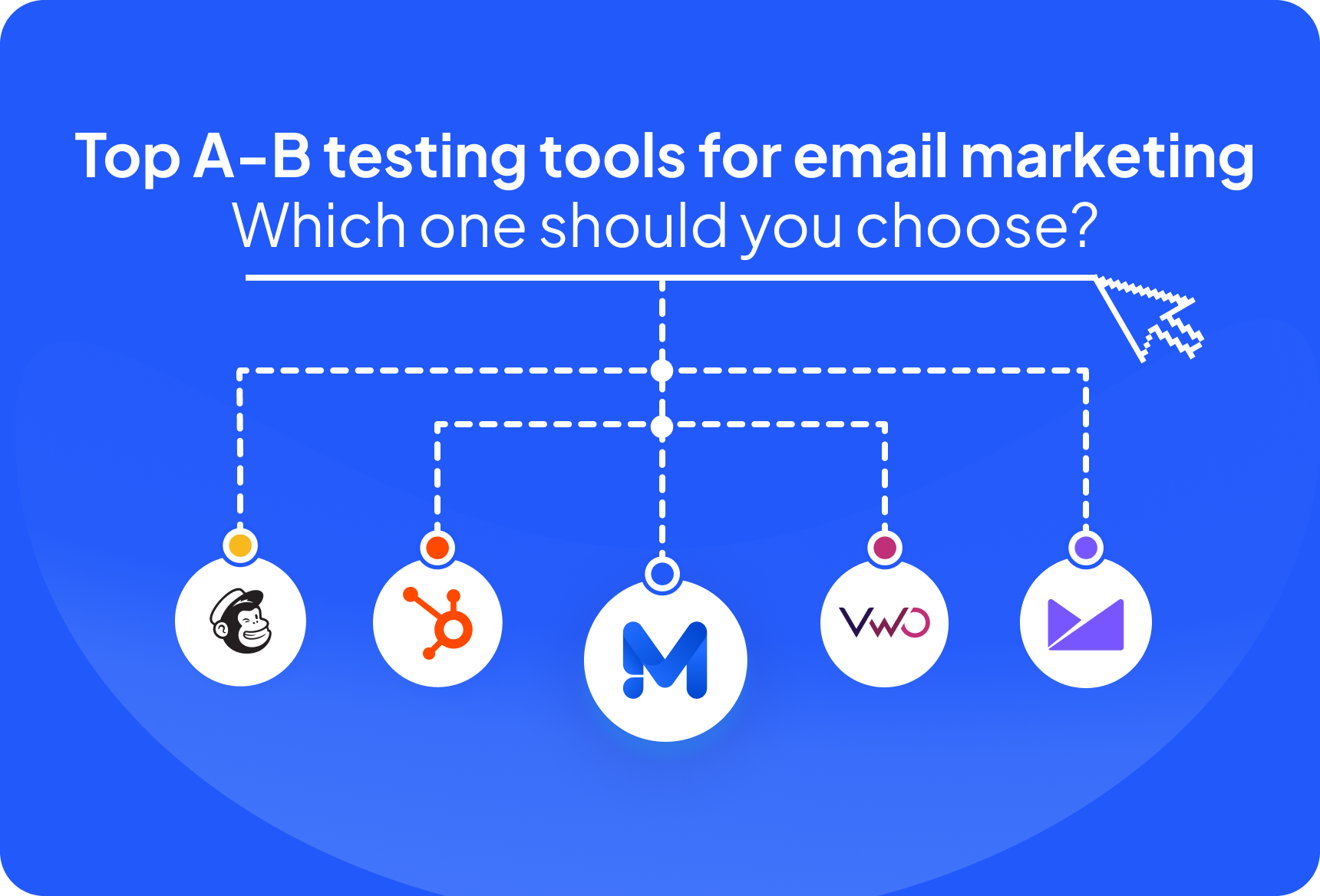
You shape them and push through. Every A/B test kicks off with these stages—nothing here is window dressing. If you skip even one, you’ll watch your results flatten out or insights grow stale. Keep this table handy while searching for Best A/B Testing Practices to Boost Email Open and Click Rates.
| Stage | Key Tasks | Goals |
|---|---|---|
| 1. | Define what counts as a win, break up your audience, pick one variable to tweak. | You need clarity—pin down what success means and aim for changes you can actually use. |
| 2. | Sort test groups with care. | The point here is to prepare catchy and fair variants, where only one element changes at a time. |
| 3. | Schedule your sends, randomize who gets what, keep an eye on deliverability rates. | Launch isn’t just push-button—you’re making sure the test stays unbiased and every email lands on time. |
| 4. | Track who opens, record clicks, note bounces, gather every last engagement metric. | Collect enough data so comparison isn’t just a hunch. |
| 5. | Stack the numbers side by side, hunt for any real shift, jot down what worked and what fizzled. | Map out what you change next time instead of repeating old moves. |
Maybe your team has patience. But the crews who hit every single step, sometimes obsessively, rack up more than quick wins. Open rates rise, and click rates push steadily higher—across the whole calendar, not just one lucky blast. If you layer those Best A/B Testing Practices to Boost Email Open and Click Rates through all your campaigns, guesswork starts to shrink. Sustained growth, though?
Step 1: Formulate a Clear Hypothesis
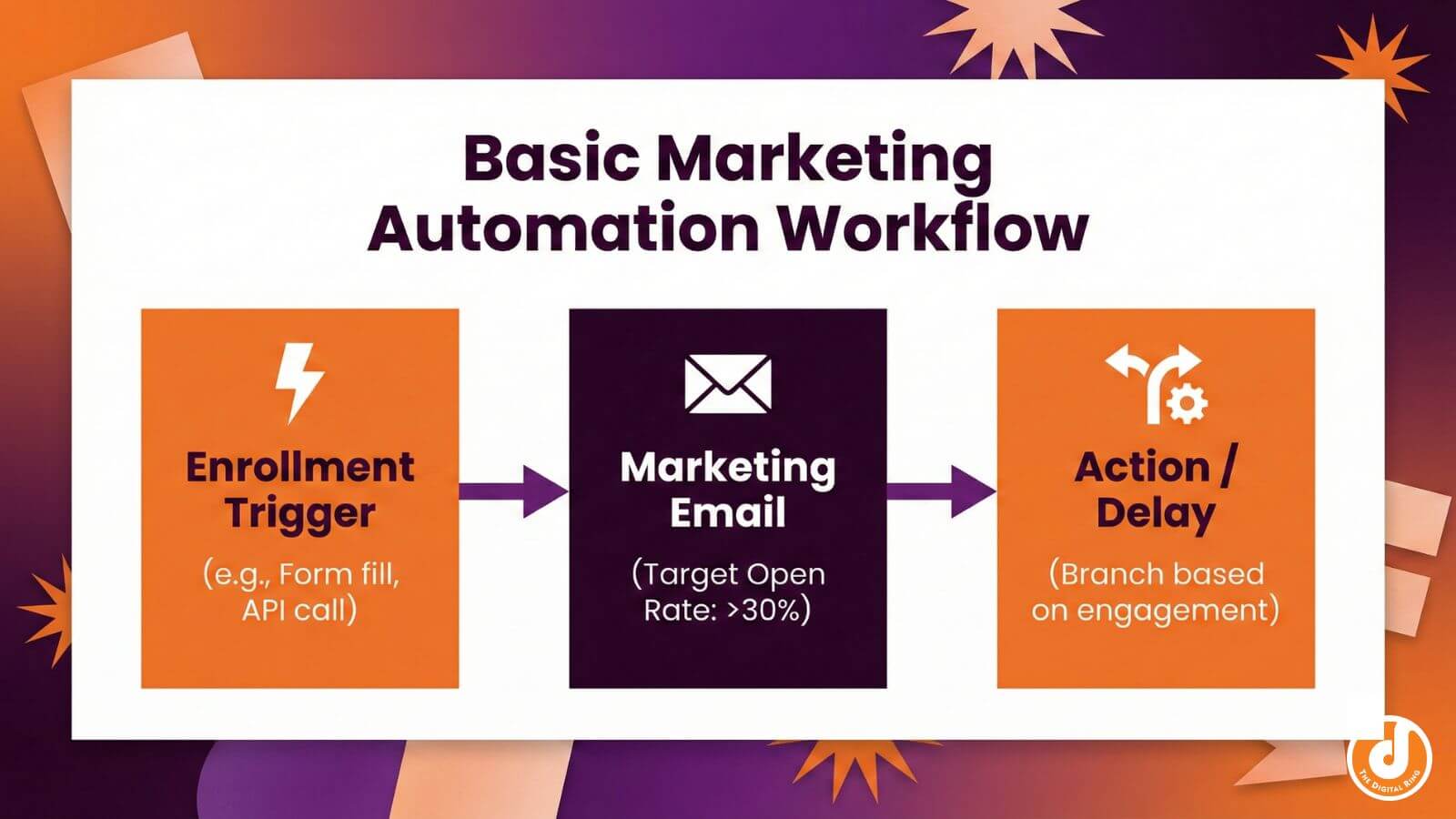
A sharp hypothesis nails your A/B test to one thing you care about. Not just a feeling—pick a metric. You’ll need to write down if you’re chasing open rates, click rates, reply rates. If you can’t blurt out what you’re testing in plain language, then you’re just spinning your wheels—changing details for no reason, hoping fortune drops a result in your lap. You start bragging about wins that aren’t real. Sometimes the actual uptick just slips by unseen. Specifics slice through the mess.
- Grab a single lever: maybe the subject line format, sender ID, or a fresh button. If you squeeze in three changes, your data turns into spaghetti.
- Want a bump in open rates? Think landing page tweaks, button tweaks, offer placement. Reply rates show up in personal emails. Don’t settle for a fuzzy “better engagement.” Name the target.
- “Using [First Name] in the subject will boost open rates by at least 5%.” There’s a forecast, there’s a number. People know exactly what you’re aiming for, whether you win or tank.
- Give it ammo—a chart from last quarter, Mailchimp’s gold standard, maybe new audience research. “Dropping an emoji in the subject line catches attention—open rates should climb 10%.” Not bland: “Emojis help.” Make it bite.
- Boot out all gray-area phrases. “Testing a new color might help.” Soft. “Trying a different template could improve results.” Disguised hand-waving. No one can tell if you actually hit the mark.
Last spring, the SaaS team switched sender ID for one campaign (at least usually). Open rates popped up: 12% higher.
Local time instead of 11 a.m. You see the crisp version: “Sending at 8 a.m. Will lift click rates by 7% or more on weekdays.”
Now the mushy one: “Changing the subject line might get us more attention.” No metric, no target, no scoreboard.
Skip the vibes, grab recipes. Your campaign lands real gains, not flickers that vanish. That clear hypothesis rips a path through every step—tracking the numbers, planning the next run, spotting the outcome in daylight. The work speeds up (in most cases).
Mailchimp A/B Testing Proven methods
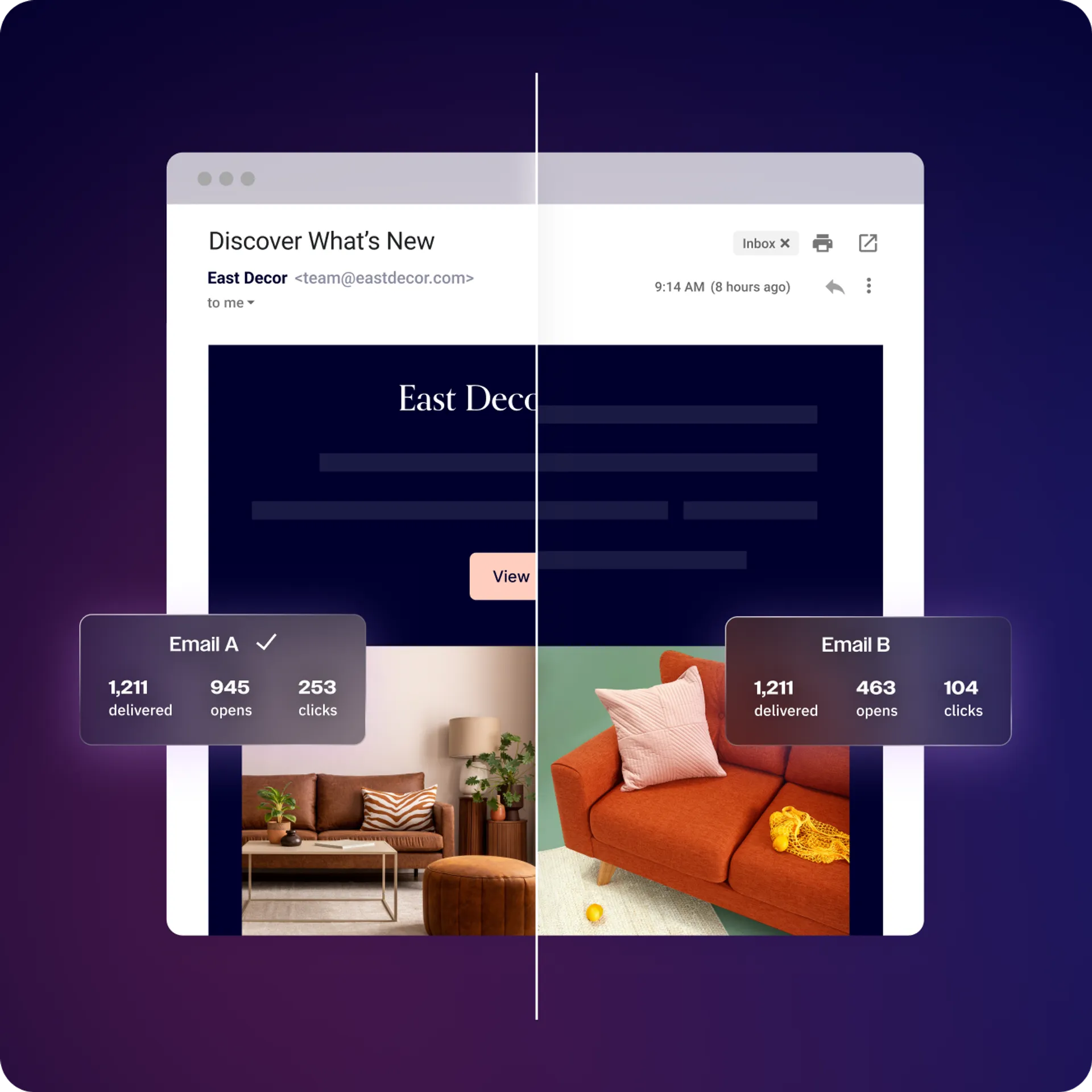
Step 2: Segment Your Audience for Reliable Testing
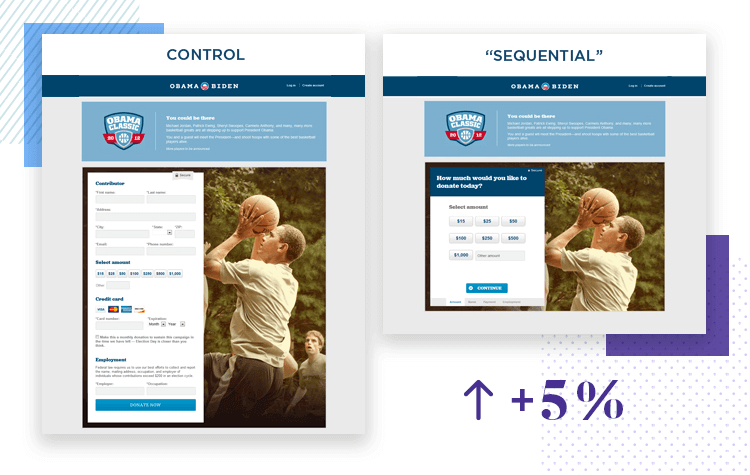
Some marketers just dump an A/B test on their whole email list and hope for magic. That’s wishful thinking, not measurement. Skip segmentation, and your test is built on sand. If this piece crumbles, the campaign has no foundation. Your list should break so Group A and Group B almost mirror each other: ages match, phone types overlap, open rates stay in the same ballpark. Don’t pack one crowd with night owls and the other with digital ghosts, the kind who never click. You’re not testing apples against oranges—you’re tossing bricks at fruit, so the conclusions don’t mean a thing.
Here’s how you protect your test from chaos and noise:
- If you have under 5,000 contacts, carve off at least 500 for each test arm. Shortchange this step, and randomness slips right into your stats, swinging results like a wild pendulum.
- Most email tools give you a random split—use that. Drag-and-drop groups, manual tagging, picking with your own hands? Patterns creep in, every time. You want the dice, not handwriting.
- Test group stays put; control group stays pure—no overlap, not even a single repeated email. Cross the streams and your result’s contaminated, right from send number one.
- Decide who belongs to each group and lock the gates shut before you hit send. If people trickle in halfway, you’ve just soured the whole test, and your result goes stale.
- Retirees, Gen Z, silent types, serial clickers—they all need to be both in A and B. Miss that, and you won’t see if your tweak did anything; you’ll just watch the demo differences dance.
- Shuffle activity, don’t let it clump. Your eager new subscribers—the ones who click everything? If you clump, that’s not a test, it’s a rerun of who joined most recently.
Parity doesn’t mean identical totals—it means A and B match everywhere except for the one twist you’re actually testing. People who actually dug into Best A/B Testing Practices to Boost Email Open and Click Rates know there’s a canyon between fair and foggy. Did you load your heavy spenders into just the first group? Did segment B only run during Thanksgiving’s open-rate roller coaster? The result’s toast. Run it right and when one version takes off, you can trust the win. Next time, you walk in knowing what actually moves your numbers.
Step 3: Design Test Variants That Reveal What Works
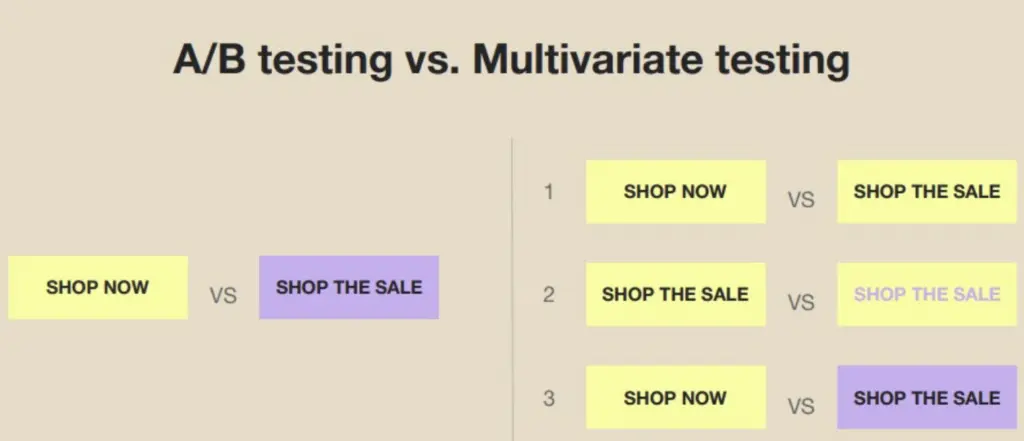
The most successful teams anchor their experiments around one variable at a time. Sharp A/B tests begin with a single clear question: what exactly are you changing, and why. If you tinker with both the subject line and the main image at once, the results melt into soup — was it the headline shift that boosted opens, or did the image do the trick.
A disciplined approach means selecting one lever per test cycle from this set:
- Subject line — does urgency, curiosity, or a first name nudge the open rate higher
- Sender name — the brand, a person, or something offbeat that might spark recognition
- Preheader text — those first few words that show up in the inbox preview
- Call to action button — color, shape, copy, and placement can all move click rates
- Main image — swap art or try plain text to see what triggers engagement
- Content structure — short versus long, bullet points versus story, or even the order of information
- Time of send — morning, afternoon, or in sync with a specific time zone
That is the silent killer of clarity. When you test a pile of things at once, every winner is a guess and every loser is suspect. The best A/B testing practices to boost email open and click rates focus on isolating a single element, so each result is pin-sharp and actionable. If you crave certainty, stick to one knob.
Document each variant with care. Give every test a simple, searchable name and keep detailed notes on what you changed. This running log builds an internal knowledge base you can scan for pattern breaks or breakout wins in the future.
Seasoned teams run through this process a second time, seeking blind spots. Did you inadvertently change the call-to-action wording while crafting a new button style? Consistency here protects the signal from the noise—just what the data doctor ordered. They practice patience, stacking single changes, then roll forward with winners for the next round. That is how you carve real gains from the daily churn of email.
Campaign Monitor Split Testing Insights
For close looks into real-world test designs and outcome tracking, see the Mailchimp Email Testing Playbook on G2.
Field-Tested Habits for Consistent Email Testing Wins
- Test one variable at a time—subject line, call to action, or send time—so you know what genuinely moves open or click rates without muddying the results.
- Choose a sample size big enough to capture real behavior patterns, not just statistical flukes; aim for at least 1,000 recipients per variant when possible.
- Send test variants at the same time to avoid random swings from time-of-day bias—timing consistency matters more than you think.
- Use random splitting for your test groups to avoid skewed data; don’t let your best subscribers accidentally pool in one group by mistake.
- For subject lines, keep tests simple: focus on length, personalization (like inserting a name), and clear vs.
- For content tests, try one bold creative shift at a time—such as switching from one-column to two-column layout, or testing a new header image.
- Set a clear, singular winner metric before sending—will open rates or clicks decide the winner—not both combined; this keeps reporting honest.
- Track results for at least 48 hours post-send before picking a winner, since many subscribers open messages late.
- Always rotate your control group—never stick with the same “safe” base version for months; staleness kills learning and stalls open rates.
- Document every test’s variable, performance, and winner in a shared log; over time, this trail gives you blueprint-level insights for your audience.
- Build your schedule around frequent, small tests; don’t wait weeks between campaigns. Rapid iteration yields fresh improvements fast.
- Periodically revisit tests that won in the past, since audience tastes and inbox algorithms shift—what worked in 2025 may tank in 2026.
Nailing these details fuels the Best A/B Testing Practices to Boost Email Open and Click Rates, let you stack small wins, and drive bigger campaign lifts over time. Consistent focus on these repeatable habits outpaces one-off ideas or trendy hacks every time (at least usually).
| Product | Our Rating | Best For | ||
|---|---|---|---|---|
 |
1Mailchimp |
4.7/5
|
A/B testing optimization | Read More |
 |
2Campaign Monitor |
4.8/5
|
A/B test-driven marketers | Read More |
 |
3HubSpot |
4.9/5
|
Email campaign optimization | Read More |
 |
4ActiveCampaign |
4.8/5
|
Includes built-in Email A/B Testing | Read More |
 |
5Sendinblue |
4.5/5
|
A/B Testing feature allows testing | Read More |
 |
6Klaviyo |
4.1/5
|
A/B testing campaigns | Read More |
 |
7Constant Contact |
4.4/5
|
Allows testing of multiple email | Read More |
 |
8GetResponse |
4.2/5
|
Email A/B Testing feature enables | Read More |
Mailchimp A/B Testing Proven methods
If your team runs lean or your campaign budget runs on fumes, you won’t get to experiment for free. Mailchimp locks all its A/B testing tools behind a paywall. They hand out a few experimentation features on their free plan, and layer in some simple automations. That kind of generosity lets new users—or anyone with shallow pockets—start testing without digging for a credit card. But Mailchimp’s wall will shove smaller shops or solo marketers straight into the arms of those rivals. Free plans matter.
Instead of just toggling headlines or button colors, you get step-by-step help to set up your first test, or your fifth. If you want the platform to learn as you go and improve on its own, prepare for disappointment. Mailchimp’s experiment builder runs deeper than most. It’s almost hand-holding—but not quite patronizing—for marketers who still get nervous mixing subject lines. Test an image, swap out copy, dig into timing. The interface actually nudges you to think beyond just the basics, and that mix of guardrails and guidance drops the entry bar for teams with no data scientist in the room. Still, there’s a ceiling you’ll smack your head on: no AI-powered test winners, no fancy automation, not even a sniff of active suggestions. By 2026, tools like that are popping up in nearly every industry leader’s playbook; Mailchimp lags. If you want to be walked through a manual experiment, this is your lane.
Simple users, non-technical teams—Mailchimp leans into that audience. Ambitious analysts, especially those hunting for AI to do the trial-and-error for them, will call the ceiling too low. Not just easy interface switches but real, human-language tips baked right into their workflows. That makes it a magnet for small groups or midsize companies that want sharper engagement without learning statistics or reading a thick playbook. Lack of active optimization, though, sends serious data hounds running for more feature-rich hills. If your dream is trigger-and-forget, you’ll outgrow this fast. So here’s the equation: marketers wanting clear advice and actionable structure will find a fit.
| ✓ Pros | ✗ Cons |
|---|---|
| Enables email A/B Testing to directly improve open rates and conversion performance. | No evidence of A/B Testing availability on the free tier—feature may require a paid plan. |
| Provides clear actionable steps and proven methods for A/B Testing via built-in guidance. | Lacks integrated AI-powered A/B Testing tools unlike certain competitors as of 2026. |
| Lets marketers test multiple campaign elements such as subject lines, content, and send times for best results. |
Campaign Monitor Split Testing Insights

You’re not stuck just swapping subject lines here. So if you’re into that kind of hands-on, tweak-and-test loop, especially with a big email list, this setup fits. Campaign Monitor lets you mess with emails in ways most others don’t bother. You can tweak up to eight separate parts for each campaign—copy, sender, layout, you name it. That’s flexibility, but don’t expect the same for landing pages or SMS. Those areas stay untouched. The platform packs in help: clear, step-by-step guides pop up inside the campaign builder itself. No hunting through a doc jungle. You’ll find tools—just not autopilot. No AI swoops in to pick winners or automate choices. You have to eyeball the numbers, trust your gut, and rerun the test as you go.
They want you A/B testing only the subject or maybe sender. But if you want multi-channel testing or one-click automatic optimization, you’ll feel boxed in quick. Mailchimp doesn’t hand you as much manual control, at least not if you’re on their basic plan. But Mailchimp has AI in play—little nudges on when to send or what content might grab attention. Campaign Monitor leans heavier on you. You run the show, and you crown the winning email. There’s no automation making that call. If you’re new or you’ve got a lot of other marketing chaos, that can slow you down. Teams without an email nerd in the room may get bogged. The flipside: if you want deep experimentation, to poke at every detail and track exactly how each change shifts the needle, Campaign Monitor hands over the controls.
Everything resource-wise—training, documentation, support—funnels straight into email. No blinking toward SMS or other channels. You get a laser focus. That’s great if your team tracks campaign results like a hawk and improves every send. Heavily regulated or super-metric-driven industries tend to crave this. But with no AI picking winners and no automation to back you up, it’s a playground for hands-on marketers only. If you want to set it, forget it, and have a platform tidy up results, you’ll need to shop around.
| ✓ Pros | ✗ Cons |
|---|---|
| A/B Testing feature enables users to improve email open rates with data-driven experiments. | A/B Testing is limited to email campaigns; no evidence of multivariate testing or landing page experiments. |
| Campaign Monitor supports email A/B Testing, allowing testing of up to 8 elements per campaign. | Platform lacks documentation on automated winner selection within A/B Testing, requiring manual monitoring. |
| Step-by-step guides for running and improving A/B tests are accessible directly within the platform. | Users may face challenges with A/B Testing complexity if unfamiliar with campaign optimization proven methods. |
| A/B Testing can be used to increase conversions, specifically targeting improvements in campaign performance metrics. | No explicit evidence of AI-powered A/B testing tools, a capability referenced in competing marketing guides. |
HubSpot Email A/B Testing Methodology

HubSpot lets you run multivariate tests — eight variables, all in one experiment. That’s powerful, but it sits behind their paid Marketing plan. Teams with a shoestring budget get shut out. If you want advanced experimentation, you pay. Mailchimp, meanwhile, throws basic A/B testing into its lowest paid tier. You’re looking at simple trial-run features, decent enough for small shops or organizations that don’t swim in data. Then there’s that extra nudge: if you want in-depth guides or proven methods, you have to register or pay. For self-taught marketers who thrive on open resources, this is a speed bump. The platform’s price tag becomes a regular question — is the ROI enough to justify deeper marketing tweaks?
The algorithm hunts for patterns, spits out content change ideas, and suggests timing fixes. HubSpot puts AI muscle front and center in campaign testing. You don’t need to sift through endless spreadsheets or build your own insights graph from scratch. Its help is solid; you can pick apart campaigns with lots of variants — if you’ve got the paid plan. But it isn’t smooth sailing. Say you need to roll out tests across many customer lists. HubSpot makes you set things up for each segment, manually. Mailchimp and a few others automate this step. Agencies juggling five, ten, twenty segments feel the drag. That friction can mean lost hours, or lost patience. For B2B teams obsessed with constant improvement (and ready to shell out for the privilege), HubSpot’s tools drill deep and deliver real insights. Not everyone wants to climb the mountain, though. Small teams — maybe just one marketer and a cat — could find Mailchimp to be enough, speedy, and simple.
AI coaching meets split-testing: that’s HubSpot’s formula for uniqueness. The onboarding guides walk you through each test, each analysis, handholding when needed. Unless you register or pay, the best learning materials stay locked up. Only committed customers get the keys. HubSpot lets you split-test eight variables at once — more than most rivals — but you handle the setup every time. If you’re coordinating across five brands, ten mailing lists, and three promotions per quarter, this hands-on requirement sticks out. HubSpot built its reputation on technical power. Gartner’s 2026 Marketing Automation Leaderboard agrees: it scores high for integration and analytics. Still, if you’re low on money or time, or your workflow needs to stay nimble, the trade-offs can bite.
| ✓ Pros | ✗ Cons |
|---|---|
| Email A/B Testing feature enables targeted experiments to improve email open rates and conversion metrics. | A/B Testing and optimization features are not included in HubSpot’s free tier; require paid Marketing plan. |
| Open ups split-testing of up to 8 campaign elements simultaneously for granular performance analysis. | Full access to email A/B Testing guides and resources gated behind registration or subscription. |
| Provides downloadable A/B Testing Guide with step-by-step instructions and proven methods for marketers. | Does not automate A/B test execution across multiple email lists; manual setup required for each segment. |
| Integrates AI-powered suggestions to refine A/B testing strategy and boost campaign results. |
ActiveCampaign Strategies for Open and Click Optimization
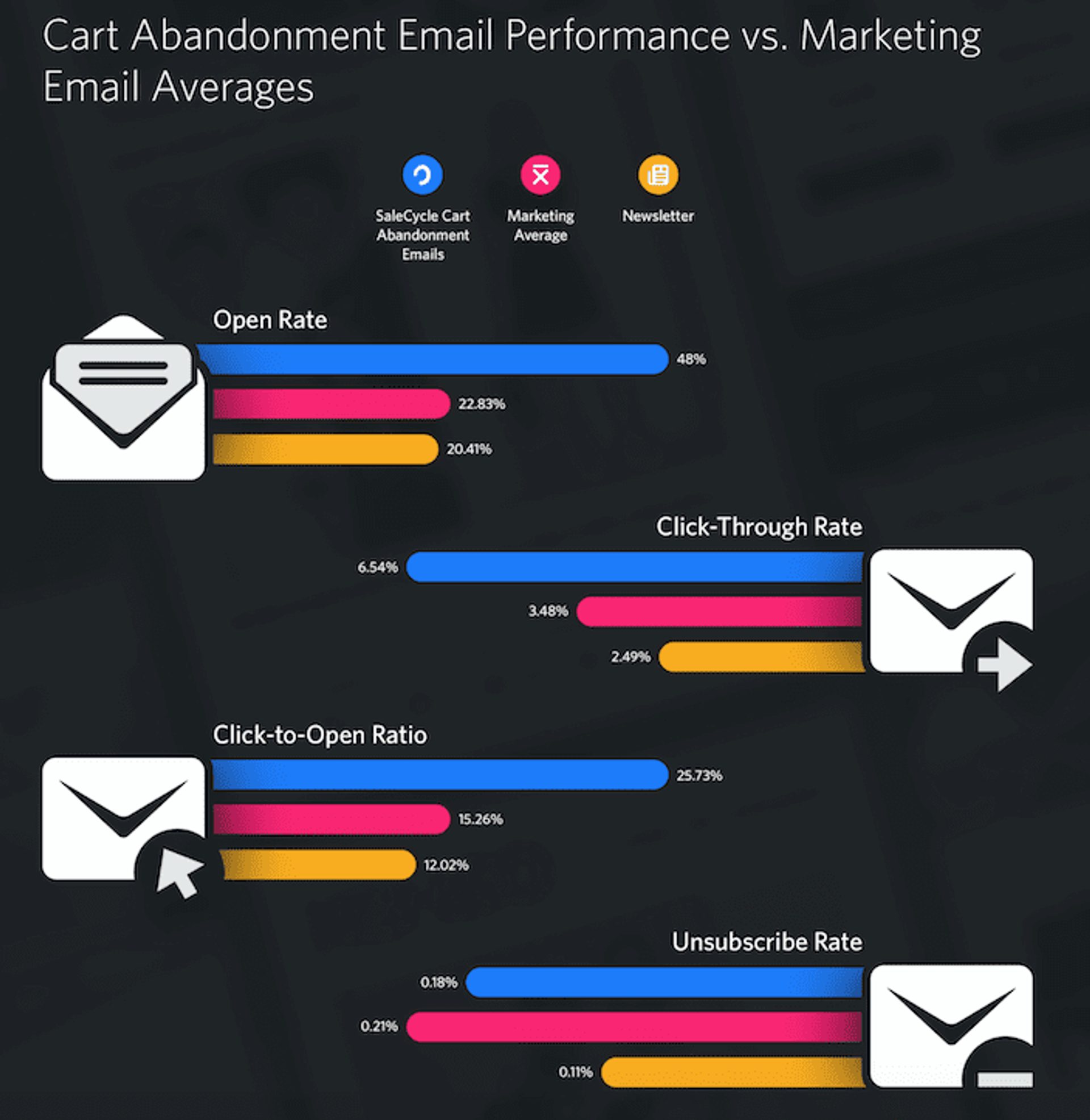
ActiveCampaign gives marketers a stack of email tools built for testing and tweaking. You can run split tests on lots of parts of your emails and automation steps, not just headlines or send times. Some platforms lock users into boring, manual split-tests—you click boxes, hope for the best. ActiveCampaign cuts loose, runs stats for you, spits out real numbers. Less hunches. Still, this engine is aimed at email. Try to test landing pages with it, you’ll hit a wall.
Mailchimp puts its split-testing behind layers—add-ons, plan gates, tedious manual setups. ActiveCampaign hands more automation to paid users. You get stronger results, sharper data, especially if you’re running several versions at once. Small shop with just a few hundred emails on deck? ActiveCampaign doesn’t let anyone on the free or entry plan touch split-testing. If you’re just starting and watching your spend, this lockout turns some teams away.
One marketer ran a campaign for 22,000 contacts and found ActiveCampaign’s automation shaved hours off routine A/B setups. For teams juggling three channels at once, though—email, landing page, social—and needing multichannel split tests, ActiveCampaign can’t stretch that far (by and large). Some rivals patch in broader testing, even dabble with basic machine learning. You’ll need to decide: is pure email your main game, or do you want wider experimentation? If you care most about making your emails cut through, and you’re ready to pay beyond entry-level, ActiveCampaign’s tools have punch. But look elsewhere if you need cheap, cross-channel options or are chasing clever AI tweaks.
| ✓ Pros | ✗ Cons |
|---|---|
| Includes built-in Email A/B Testing to compare subject lines or content for higher open rates. | A/B Testing feature limited to email campaigns; cannot directly test landing pages within ActiveCampaign. |
| Automates split-testing workflows, ensuring results are statistically major for email optimization. | No evidence that A/B Testing is available on the free or lowest ‘Lite’ plan as of 2026. |
| A/B Testing feature can help marketers increase conversions by identifying high-performing variations. | Results from A/B Testing are dependent on sufficient subscriber list size for accuracy. |
| Allows testing of multiple elements such as subject lines, CTAs, and body copy within campaigns. | Does not explicitly reference AI-driven A/B testing optimizations found in some competitor offerings. |
Sendinblue A/B Testing Workflow Explained
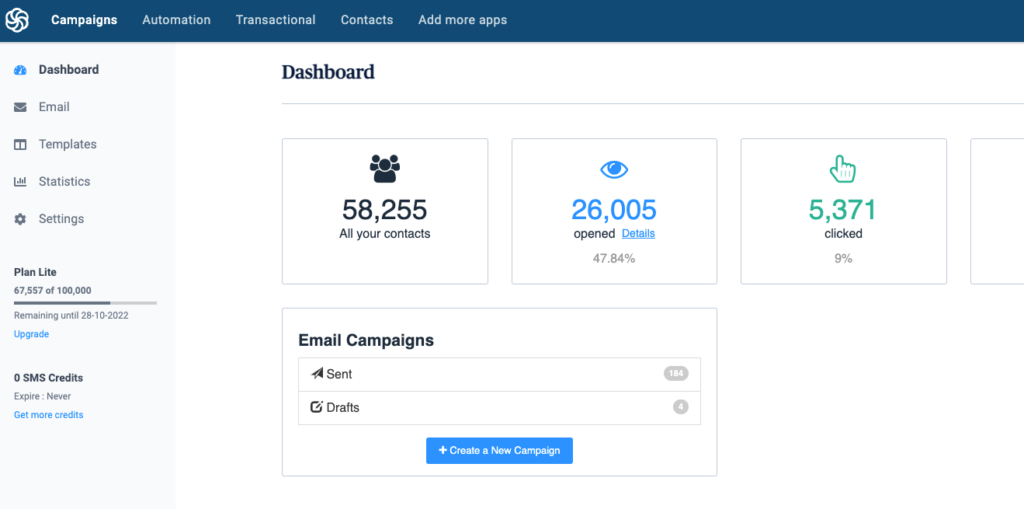
Sendinblue’s A/B Testing module is built just for email. You tweak headlines, tinker with your message, or pick the timing. As of 2026, its price tags cut 40% below what HubSpot asks for automation-heavy plans. That gap catches the eye of anyone counting pennies. Still, you’ll need to roll up your sleeves. When a variant wins, Sendinblue won’t roll it out for you automatically—there’s no behind-the-scenes push. You do it by hand.
You test email splits up front, see the numbers, and move on. HubSpot spreads itself thin over automations and channels—SMS, landing pages, the works. That comes at a cost. Their cheapest plans shoot past $60 a month, so it’s not wallet-friendly for everyone. Sendinblue ignores winner propagation and skips the fancy logic, sticking to basic tools for email-only trials. That speeds up rapid cycles. Marketers who want to try, learn, and repeat—this lean approach suits them. It won’t work if you’re craving advanced stuff. No AI nudges. Automation junkies, or teams managing thickets of cross-channel campaigns, will hit roadblocks quick. They save money and focus—no paying for gear they never touch.
If you crave multi-channel reach or want to test three or four email variants at once, you’ll find Sendinblue’s fence soon enough. One big draw: you kick off side-by-side email tests and get results all in one place. You skip hopping back and forth to other analytics tools. For small teams on tight budgets, that’s gold. Manual setup and limited channels aren’t deal-breakers if the main goal is ease and low spending. For marketers running slick, automated workflows, or mixing up test designs with lots of channels and variables, bigger platforms take the lead. Sendinblue zeroes in on the backbone: A/B tools made for core email work. No published stats compare open or click rates head-to-head. Tight feedback, quick experiments, straightforward improvement.
| ✓ Pros | ✗ Cons |
|---|---|
| A/B Testing feature allows testing multiple email elements to improve open rates and conversions. | A/B Testing does not extend to SMS or transactional messaging workflows as of 2026. |
| Supports evidence-driven campaign improvements by comparing variant results within a single dashboard. | Workflow does not automate winner resends; users must apply winning variant manually to subsequent campaigns. |
| Enables marketers to run split campaigns directly, improving subject lines, content, and send timing. | Lacks AI-driven test recommendations, requiring manual selection of test parameters by marketers. |
| Sends can be systematically segmented for A/B tests, increasing actionable feedback for future campaigns. | No documented support for multivariate testing beyond standard A/B, limiting test complexity for advanced users. |
Klaviyo’s Approach to Email Testing
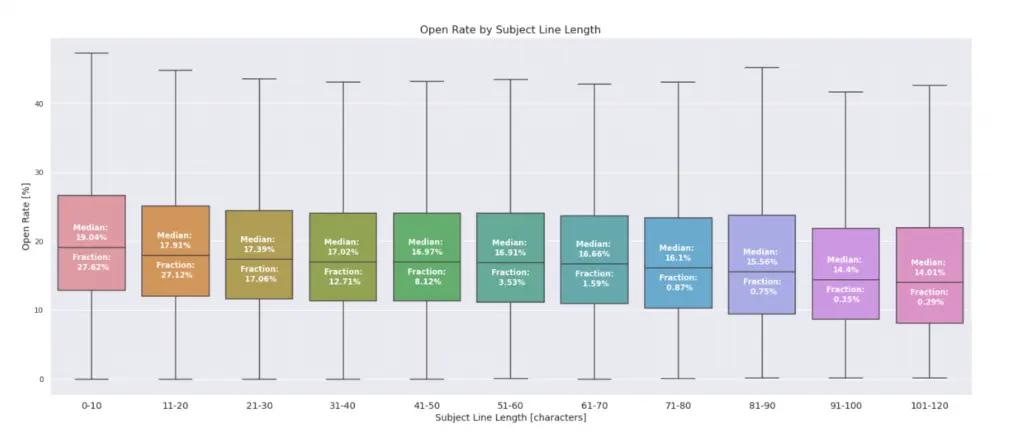
Klaviyo hands you a toolkit for experiments. Some folks will just skip to another app where rules and features stand in the open. Try out new send times. Mix things up, measure, repeat. The system doesn’t say how many variants you can run—not upfront, not on the starter plan (broadly speaking). No bulletproof automation flows come with the cheapest tier either, just silence on the limits. So, if you want everything spelled out—what you get, what you don’t—you might get uneasy.
Klaviyo lifts the fences—you get testing tools no matter your plan. Not every platform does it this way. They guard serious experiments behind higher-priced walls. But look: some rivals keep variant policies easy to find, post them right in the docs. They wire automation directly into entry plans. No puzzle-box, less friction, especially for small shops. Others make it simple, no guesswork. But in Klaviyo’s base offering, you won’t find step-by-step walkthroughs or training built in. If you’re green, you’ll have to go hunting for tips. The platform pulls in marketers who like to tinker, people happy to fly manual and take the dashboard wheel. They’re not aiming at teams who crave preset answers or lots of embedded help.
Routine split test setups get automated—the grind work falls away. The data dashboard flashes outcome numbers fast. Experts, the battle-worn email teams, love that. They can flip tactics on a dime after looking at the numbers. That speed keeps their testing engine running hot. But say you’re the type who wants strict guardrails—preset rules for how far you can push an experiment, or a library of proven methods loaded and ready. You’ll feel boxed in on the entry plan. It’s not all mapped out. Teams with practiced hands, comfortable threading their way through charts and CSVs, eke out more from Klaviyo’s toolkit. If you want the whole system to spell out optimizations, or you need a trust fall of guidance built in, Klaviyo expects you to look elsewhere—or go find those resources on your own.
| ✓ Pros | ✗ Cons |
|---|---|
| Email A/B Testing feature enables marketers to directly test subject lines, content, and send times to boost open rates. | A/B Testing feature does not specify the maximum number of variants allowed per test within the base plan. |
| Allows A/B testing on multiple email elements including headlines and calls to action for detailed optimization. | No mention of built-in AI tools for automating A/B suggestions as standard in the entry-level tier. |
| Provides data-driven recommendations based on A/B Testing results to inform future campaign strategy. | Detailed reporting or learning resources for A/B Testing proven methods may require consulting external guides. |
| Automated workflows let users set up split campaigns and measure results without manual segmentation. |
Constant Contact: Improving Open and Click Rates
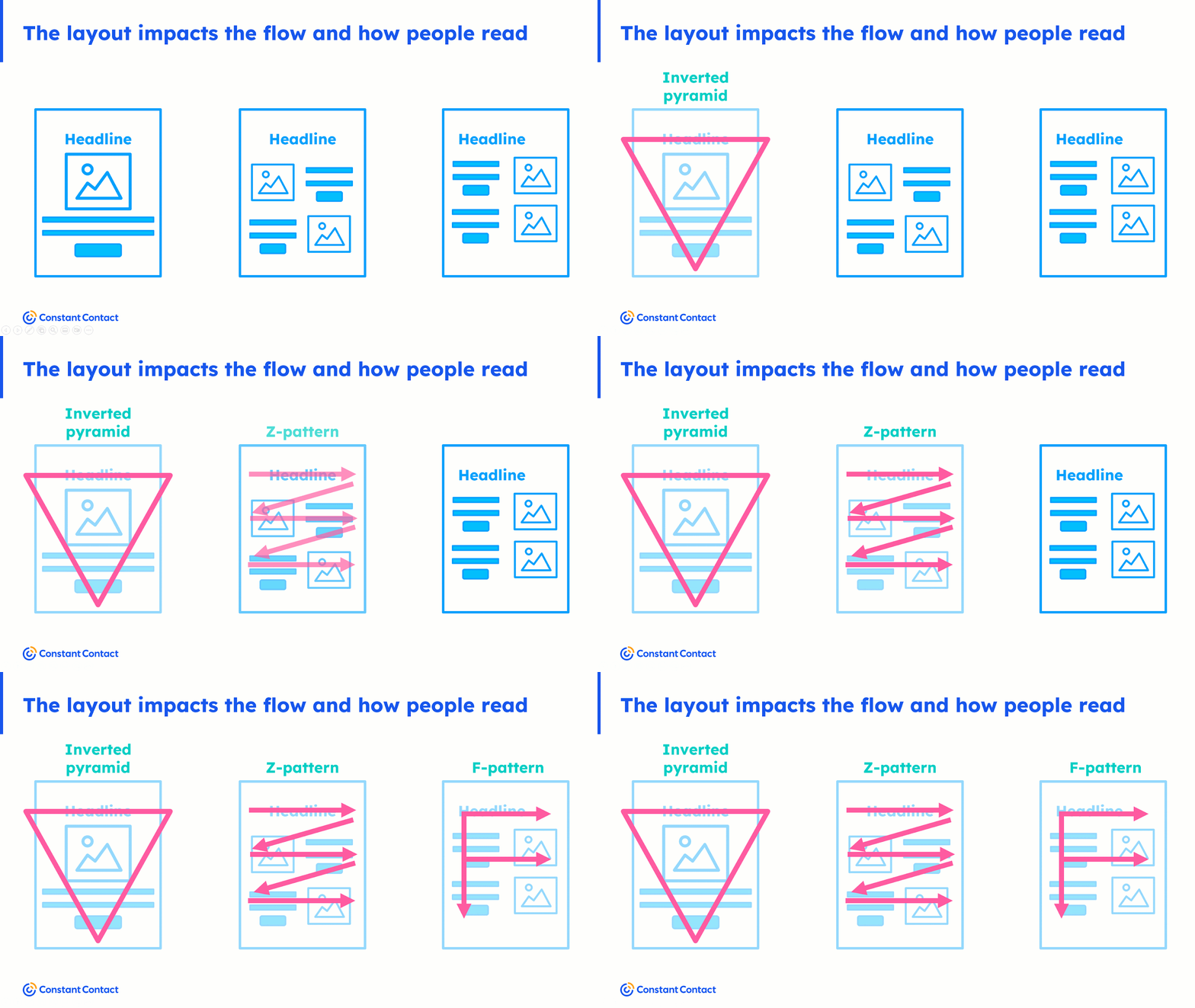
Constant Contact now lets anyone on a paid plan run email tests. You don’t have to pay extra. Even the entry-level package includes this. That means you can tweak subject lines, switch up your text, play with timing—all without busting your budget or hitting a paywall. If you’re on the cheapest tier, you’re allowed to run tests from day one. That’s handy and levels the field for marketers, small teams, and solo operators. But these tools don’t work outside email—you can’t test SMS or social blasts here. For that, you’ll need another platform.
The gulf between Constant Contact and Mailchimp starts with pricing and testing muscle. Mailchimp reserves fancy tests—multivariate, AI-driven stuff—for bigger spenders on premium plans. Their logic: advanced tools for deep-pocketed firms and teams chasing complex analytics. Constant Contact skips the shiny tech and sticks with simple A/B testing for everyone. If your squad just wants to shift a few variables and see what lands, no drama, no algorithmic tricks, this platform fits. But only if you’re fine working in email, not jumping channels or wrangling several variables at once. Larger companies, or marketers who want AI’s edge or layered tests, will run into walls pretty fast.
Here’s how the usability shakes out: Constant Contact’s testing features are stupid-simple. You don’t need to be a data scientist to get started. The workflow walks you through step-by-step, so you can dodge the technical potholes. Beginners will not be overwhelmed or hopelessly lost. That’s gold for any lean team hunting for reliable feedback, fast, without slogging through analytics labyrinths. Still, there’s a very real cap. No multivariate or advanced test designs. The buzzier AI-powered automation, which might be everywhere by 2026, just isn’t here. If you want email-only, clear results, and sanity-check experiments, Constant Contact fits the bill. For deeper feature breakdowns and side-by-side vendor reviews, look up the Gartner Magic Quadrant for Email Marketing Platforms.
Gartner’s document weighs these platforms, ranks their features, and spells out differences for both technical and non-technical buyers.
| ✓ Pros | ✗ Cons |
|---|---|
| Offers built-in email A/B testing to improve open rates and drive better campaign conversions. | A/B testing for email campaigns does not extend to SMS or social channels within Constant Contact. |
| Allows testing of multiple email elements—subject lines, content, send times—for data-driven performance refinements. | Lacks AI-powered A/B test optimization mentioned in some competitors’ offerings as of 2026. |
| Provides step-by-step guidance and proven methods within the Email A/B Testing feature for marketers. | No option to run multivariate tests—limited strictly to traditional A/B testing formats. |
| Email A/B testing is accessible with all paid plans, supporting structured experimentation at any subscription tier. |
GetResponse Email Performance Testing Techniques
GetResponse hypes its AI tips for marketers chasing slow, steady wins (in most cases). It aims at teams that want to tinker their way to stronger campaigns bit by bit. No actual numbers for subscriber or send limits show up front. That’s trouble for someone hunting clear details on a budget—the starter plan doesn’t spell it out, so you could be boxed in and not even know until you hit a wall or poke support for answers.
Mailchimp shoves its subscriber and send limits right on the table. You know what you’re dealing with from the start on both free and paid levels. GetResponse hides the cap details. Their starter plan leaves you guessing about A/B testing quotas. Some users launch their test, cross their fingers, then realize later that access isn’t guaranteed. No easy chart, no “here’s your limit” popup—just murky territory unless you ask or experiment.
Changing one subject line, then moving send times, then new segment tweaks—GetResponse lets you stack these variables and churn through them. But for users craving sharper segment options and a slow burn of campaign improvements, GetResponse’s tangled structure might deliver. The platform’s laser focus on campaign testing scratches an itch for marketers obsessed with squeezing out more clicks. The system chews on your changes and spins out ideas for what to fix next. That’s baseline workflow here: put your campaign under the microscope, keep tuning, repeat. Mailchimp goes the opposite way—visible analytics, clear tiers, and the free trial spells out what feature comes with what level. It’s for the cautious, or someone who wants a fence around their setup at first, not a maze.
If your team wants to break apart every email piece for learning, this platform hands you the toolbox. Some buyers walk away from GetResponse with questions still lurking—what can I do, how often, is this box really unlocked? Dashboard piles on testing tools and drops AI-powered recommendations. There’s no verified real-time analytics feed—so someone needing instant stats may find the product thin. Still, the depth and tuning flexibility lures marketers who care more about actionable experiment feedback than live performance graphs. If you’re fine digging deep, picking apart every element, and don’t mind figuring out pricing from squishy rules, GetResponse fits. For shops demanding easy setup and one-click live snapshots, Mailchimp’s feature sheet lands cleaner.
| ✓ Pros | ✗ Cons |
|---|---|
| Email A/B Testing feature enables systematic optimization to improve open rates and conversions. | No documented subscriber or send limit specified for A/B Testing feature; potential caps may apply on entry plans. |
| Supports testing of multiple campaign elements for data-driven refinement of email marketing strategies. | No explicit claim of real-time analytics integration with A/B Testing results as per evidence. |
| Provides AI-driven tips for improving email A/B testing performance. | Evidence does not clarify if A/B Testing is available on the free tier or restricted to paid tiers. |
Putting What You’ve Learned Into Action
Sticking to the core principles from the best A/B testing practices to boost email open and click rates means campaigns no longer run on guesswork or stale tactics. Every email can teach you what works (in practice). Mailing lists grow, subscribers learn, and the algorithms that filter your email get sharper by the month. Small changes to subject lines, send times, or preview text compound quickly into major engagement gains.
Each test, no matter how minor, sharpens your insight into what your audience craves today. The real gains come not from theory but from constant iteration. Adopting these proven methods and benchmarking with tools like Mailchimp or HubSpot means you’re building strategy on data, not superstition—unlike those teams still sending generic blasts week after week hoping for a miracle.
Track the numbers as promised by your chosen platform. Try one split test with your next campaign. Learn, adjust, and keep moving; in a crowded 2026 inbox, habits anchored in A/B testing are the only defensible edge.