Why Home Network Security Against Deauthentication Attacks Matters

Deauthentication attacks have become a big problem for home networks. They cause service interruptions and let attackers mess with your devices, which can ruin your day. A Complete Guide To Securing A Home Network Against Deauthentication Attacks Explains what these attacks are and why you need multiple layers of defense. The attack tricks Wi-Fi devices by sending fake deauthentication frames that tell your device to drop off the network suddenly, even though the Wi-Fi password hasn’t been cracked. Hackers slip in by exploiting how Wi-Fi manages client devices.
This isn’t just a normal internet outage. The attack is deliberate and can be a distraction or a way to sneak sensitive data by forcing your device onto a fake network. With smart homes everywhere and more people working remotely, these risks grow. Attackers can steal data, shut down home security cameras, or knock out your internet. That’s a real hit to privacy and your daily routine.
Wi-Fi’s design itself leaves a door open. Most wireless standards, like IEEE 802.11, use management frames that aren’t encrypted or verified. That gap lets anyone with cheap, off-the-shelf hacking gear launch attacks. No need to guess your password; they exploit how the system implicitly trusts those frames. Around 2026, newer tech and updates aim to detect and stop these packets better—but old or cheap gear still stays defenseless.
Disrupting Wi-Fi signals exchanged between your gadgets and access points, the attack effectively severs your devices from the internet. Stopping deauthentication attacks means knowing how they work and what attackers do. Ensure your equipment supports protected management frames (PMF), deploy tools for spotting unusual network activity, and configure routers with up-to-date security protocols like WPA3. Skipping these steps puts you at risk. Smart users update firmware often, split their networks so weak devices don’t endanger everything, and use intrusion detection systems tuned to catch fake disconnect attempts.
- Deauthentication attacks don’t need your network password
- They break connections by tricking unprotected Wi-Fi management frames
- Many home routers lack advanced protections
- Devices can reconnect to fake hotspots, risking data theft
- Attack tools are cheap and easy to use
But many people haven’t upgraded, and lots of routers sold today don’t fully guard against these forced disconnections. Wi-Fi standards are pushing stronger security, like making digital signatures mandatory in PMFs with WPA3. That means you might face stopped service or man-in-the-middle hacking after being kicked offline.
Understanding Deauthentication Attacks

These programs watch your network for sudden bursts of deauth packets or weird device responses. A Complete Guide To Securing A Home Network Against Deauthentication Attacks Also talks about special software. They add quick alerts and reactions that most home routers miss entirely.
Nearly every home setup has blind spots—old gear, tight budgets, or missed security tweaks (in plain terms). Knowing how deauthentication attacks work and why homes are especially at risk makes one thing clear: active defense is a must. Defending against this isn’t just about firewalls or antivirus anymore. You need a full plan: upgrade hardware, add smart monitoring tools, and watch your network for odd behavior. The danger is real: ongoing outages that block work or knock offline critical gadgets. Coming next are detailed ways—manual and automated—to fight back, detect attacks fast, and stay safe from this growing threat.
Many government and industry reports confirm that these attacks are rising in homes and small offices. Their advice backs up the technical tips ahead, helping you stay ahead of hackers who keep getting craftier. They highlight the urgent need for simple, usable defenses for regular users. For trusted, updated standards, check the National Institute of Standards and Technology’s wireless network security guidelines.
- Detailed explanation of deauthentication attacks and their impacts
- Step-by-step software configuration for defending against deauthentication attacks
- Real-world examples and case studies of deauthentication attack mitigations
- Tools and software specifically designed to detect and block deauthentication attacks
Understanding the Nature and Impact of Deauthentication Attacks

“A Complete Guide To Securing A Home Network Against Deauthentication Attacks” shows how bad actors exploit changes in Wi-Fi rules to interrupt wireless connections. Many home Wi-Fi networks have a weak spot. They use something called management frames from the IEEE 802.11 protocol—especially the deauthentication frame—which normally tells devices to disconnect for legit reasons.
So, someone can fake deauthentication signals easily. This means users get cut off from Wi-Fi again and again. These frames usually aren’t encrypted or checked for validity in most home setups. The result? Devices suddenly drop off the network, even though admins didn’t ask for it.
Mostly, they try to cause denial-of-service by kicking devices off the network. Attackers want different things with this trick. But that disruption is just a start. After forcing disconnections, attackers can slip in counterfeit access points. These fake Wi-Fi spots use the exact same network name (SSID), hoping users connect by mistake. Once hooked, attackers steal passwords, banking info, or private chats.
Homes that rely on wireless for work or smart gadgets see big disruptions. This problem hits more than just nerves (for the most part). Worse, breaking into the network’s trust lets attackers sneak malware in, spy on sessions, or swipe sensitive data.
It’s so simple that even novices can launch it with cheap gear and public hacking tools. The attack leans on a core flaw in Wi-Fi: control frames like these are invisible to standard protections such as WPA2 or even WPA3 without extra setup.
Recognizing Vulnerabilities in Home Networks

Deauthentication attacks happen like this:
- The attacker scans to spot devices and the router’s address.
- They create fake deauthentication frames pretending to be the router or clients.
- These frames hit devices, abruptly dropping connections.
- The attacker waits while devices try reconnecting, then plants a fake access point to spy or intercept.
- Sometimes, they dive deeper after the victim connects to the bogus point.
The method sounds basic but works well in practice (as a rule). For example, criminals have shut down home internet to extort money or eavesdrop on people. Public documents confirm that these management frames remain a soft target, proving patches and fixes matter.
They’ll keep trying until the bad guy quits or security steps kick in. Lots of smart home devices auto-reconnect, making repeated attacks easy.
Attackers also tailor this tactic to spy on certain folks by isolating their device traffic. This can grow into identity theft or corporate spying, a real privacy red flag for homes that care about security.
People can then use detection tools or firmware tweaks that block or encrypt these frames to kill fake signals. Stopping this requires knowing how management frames act and spotting signs—like frequent drops without admin changes, devices that won’t reconnect, or strange Wi-Fi spots nearby.
Software Solutions for Deauthentication Attack Prevention
Attackers use weak protocol points to knock networks offline or steal data going over Wi-Fi. In short, seeing the many layers of risk in deauthentication attacks matters. Without strong defenses, home networks face steady threats to use and privacy.
This flaw, where deauthentication frames remain unsecured, highlights old Wi-Fi’s limits. Even in 2026, many consumer routers run default or outdated software, leaving this door wide open. Government sources back this up and give deep technical advice on why stronger protections must come first for home network stability (NIST publications on wireless security).
Common Vulnerabilities That Enable Deauthentication Attacks
Home networks have weak spots that make deauthentication attacks shockingly easy. A Complete Guide To Securing A Home Network Against Deauthentication Attacks Reveals how hackers exploit protocol flaws and setup errors to cut off devices.
These leave management frames—like deauthentication packets—totally unprotected. Some routers and devices use old Wi-Fi standards before 802.11w. The frames fly around unencrypted and unchecked, so attackers can watch and forge them. That lets bad actors send fake “disconnect” commands that boot devices offline without warning.
Many devices don’t fully adopt Management Frame Protection (MFP), a feature that 802.11w added to secure these messages. This patchy support leaves strange blind spots wherever MFP is disabled or ignored.
Control and management packets often skip encryption, even though WPA2 and WPA3 protect data frames. This gap opens a door for attackers to hammer the network with fake disconnects, uncloaked and crystal clear.
Routers usually ship with user-friendly defaults, not security-first settings. They often let anyone flip off management frame protection quickly, leaving networks open for bogus commands.
Configuring Your Network to Resist Deauthentication Attacks
Open Wi-Fi or networks running weak WPA2-PSK keys have almost no defense. Without strong passwords or extra layers, attackers can easily force device disconnections at will.
They don’t verify who sent it. Devices alone trust any disconnect message that claims to come from their access point. This blind faith thickens risk across every gadget hooked up (for the most part).
Most home setups run blind, missing software that spots unusual disconnect floods or fake management frames. Attackers can keep pounding without triggering alerts, dragging out service disruptions.
Your home probably juggles gear from multiple brands, each with different levels of 802.11w support. This mix means some devices lock frames tight, but others stay vulnerable, watering down the whole network’s shield.
Old hardware is a big problem. Legacy access points and clients often miss patches that bring modern security fixes. These gadgets become open gates attackers use again and again, no matter how fresh the rest of your network looks.
Monitoring and Responding to Attack Attempts
Attackers don’t need to hack passwords—they just have to be near your Wi-Fi signal. A nosy neighbor can spoof disconnect messages from the street. No tricky tech skills required.
- The worst weakness is where unencrypted management frames collide with careless client validation.
- Few homes fully apply 802.11w; most patch security halfway.
- Spoofed source MAC addresses let attackers cook up believable disconnect orders.
- Router firmware often buries management frame protection toggles or scares users off with warnings.
Wi-Fi standards often ignore locking down management and control packets. Firmware and client software need to force both validation and encryption on these messages, making attacks costly and rare. Until then, networks stay wide open to nonstop forced disconnects that kill service and risk exposing other holes.
This issue worsens because consumer gear rarely ships with real-time attack detection. Users don’t realize a problem until connections go bad. The mishmash of protocol support lets attackers pick low-hanging fruit, slipping through gaps defenses miss.
The FCC and security experts agree: Wi-Fi management frames need stronger authentication to block abuse. New routers with WPA3 and 802.11w help, but most people either don’t know or skip setup because it’s tricky.
IEEE 802.11’s original specs left management frames unencrypted for backward compatibility and speed. The root cause? Hackers cheaply exploit this by flooding networks with unsigned frames that yank clients offline.
A fix means smarter software and rules like these:
- Enable Management Frame Protection on routers and devices.
- Use gear that supports WPA3—or at least properly secure WPA2.
- Run monitoring tools that flag sudden surges in deauthentication frames.
- Keep firmware updated to close gaps.
- Use strong passwords and disable open Wi-Fi when you can.
The path forward is clear: lock down every Wi-Fi control signal. Seal the cracks attackers need to force disconnects. Without concrete fixes, home networks stay easy targets, leaving devices trapped in endless disconnect loops. IEEE’s official docs explain how to encrypt each management frame under newer standards, raising wireless security standards in the IEEE 802.11 standard.
Effective Methods To Protect Your Home Network
Deauthentication attacks hit your home network by tricking devices into disconnecting suddenly. Stopping this needs layers of defenses. A Complete Guide To Securing A Home Network Against Deauthentication Attacks Points to some advanced tricks and settings that can really tighten your security. These attacks rely on weak management frames, old firmware, poor encryption, and no network splits. You have to take on each problem one by one.
- Enable 802.11w Management Frame Protection
Also called Protected Management Frames (PMF), 802.11w is a Wi-Fi rule that shields management frames from being faked. These deauth attacks send fake “disconnect” messages to drop clients off the network. Turning on 802.11w forces devices to check these messages with cryptographic proof, so fake commands don’t pass. Most modern routers from big brands support this, but it’s off by default sometimes. Look in your router’s advanced wireless settings for words like “PMF,” “Protected Management Frames,” or “Management Frame Protection.” Flip this on, and your home Wi-Fi becomes way tougher against fake deauth floods.
- Keep Router and Firmware Updated
Router makers push firmware updates regularly. These patches plug holes that attackers could use, including weak spots in how routers handle deauth frames. If you skip updates, your network stays open to known hacks. Many routers have options to auto-update or notify when an update arrives. Check your device’s official site every few months or if your connection acts strange. Besides security fixes, updates often add new controls for managing your setup. Not updating is a common slip-up—focus oning this can stop many deauth attack tricks discovered throughout 2026.
- Use Strong Wi-Fi Encryption
WPA3 is now the go-to encryption standard. It’s much safer than older ones because it scrambles each connection individually and protects handshake signals better. That makes it much harder for attackers to sniff or insert bad packets when deauth attacks happen. WPA3 needs client support, but most gadgets from 2026 onward have it. If you can’t use WPA3 yet, WPA2-AES is the lowest you should accept; skip outdated types like WPA or WEP—they’re cracked in minutes. Also, set a Wi-Fi password that’s tough to guess, unique, and private to block attackers trying to fake real users.
- Segment Your Network
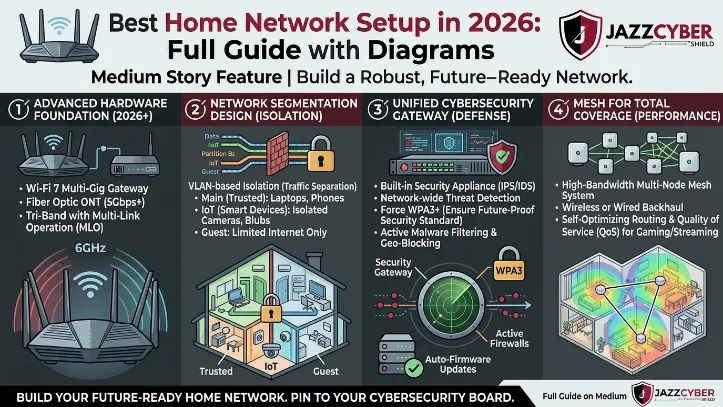
Splitting your Wi-Fi into sections protects your valuables. The usual step: create a guest Wi-Fi on a separate subnet for phones, IoT gadgets, and visitors. Keep your computers or security cams tucked away on a different subnet. If one segment gets deauth-attacked, the harm stays there. Routers often have guest network features for this. More advanced routers let you make VLANs—virtual LANs—that separate traffic even cleaner. This makes spotting trouble easier, since a problem on one side won’t spill over to everything.
- Deploy Wireless Intrusion Detection Systems (WIDS)
Some software watches your Wi-Fi for suspicious waves—too many deauth frames or strange packet floods. WIDS alerts you when attack signs pop up. These tools run in real time and help you react fast. You’ll find open-source options and some paid gadgets that fit home networks. Setting them up may need technical muscle, but active defense beats just waiting on firmware or password fixes.
- Limit Signal Range and Control Access Points
Cutting your Wi-Fi signal power or placing routers right shrinks your attack zone. Deauth attacks usually come from people near your wireless signals. Shrinking the range keeps outsiders out. Moving or shielding access points also helps stop snoopers from reaching in. When you add strong encryption on top, attackers struggle to connect or mess with your network.
- Enforce MAC Address Filtering With Caution
MAC filtering means only devices you approve get on your Wi-Fi. This adds a barrier, blocking random strangers spoofing unknown addresses. But attackers can clone MAC addresses if they want, so don’t count on filtering alone. When paired with other steps, though, it weeds out casual bad actors.
- Employ VPNs to Encrypt Traffic
VPNs wrap your internet data inside encrypted tunnels. They don’t stop deauthentication drops directly but shield your online traffic when your connection bounces back. Using a VPN app or router-based VPN keeps your data locked up, stopping interceptions or hijack attempts in rough wireless spots hit by attacks.
- Conduct Regular Network Audits
Check what devices connect, peek at router logs, and watch for odd patterns often. Strange disconnects, sudden spiked deauth frames, or unknown devices signal trouble. Many routers log how many times management frames appear or list clients with times. Scanning these logs helps spot attacks early so you can tweak security fast.
Stacking these moves builds a strong wall. Enabling 802.11w fights the core fake frame trick. Updating firmware and locking down encryption stops new exploits and unknown device joins. Network splitting confines trouble zones. Active WIDS spots attacks as they happen (at least usually).
Experts and wireless standards groups back this pack for tough home defenses. The Department of Homeland Security’s Wi-Fi security guides show how layering tools handles threats like deauth floods. Reading up on management frames and intrusion logs via open standards gives savvy users an edge beyond default router settings. See NIST’s 2026 Wi-Fi security guide for detailed plans against these threats.
Since deauth attacks abuse weak frames, outdated gear, poor passwords, or signal leaks, no one fix stops them all. These fixes take time and some know-how but each adds real strength. Layer your defenses with updated standards, sharp settings, and live monitoring. That way, your home network keeps running strong even when under deauthentication attack siege.
Recommended Security Products and Software for Deauthentication Defense
Home networks face constant threats. A simple password won’t stop every attack. You need tools built to catch sneaky disruptions. Deauthentication attacks sneak in by cutting off connections. This section points out key products and software that defend against those hits. They back up the detailed steps in this guide.
- Routers With Built-in Deauthentication Protections
Newer routers often include firmware designed to spot and block deauthentication attacks. They watch disassociation frames, using tools like Protected Management Frames (PMF), which follow the 802.11w standard. PMF stops fake devices from sending bogus deauth frames—the main way attackers get in. Brands highlight this feature, but it’s usually off by default. You have to turn it on inside the router’s admin panel. Picking a router with these protections baked in gives you a solid starting point without extra gadgets.
- Wi-Fi Intrusion Detection Systems (IDS)
Wi-Fi IDS tools scan your network for signs of attack. These systems catch odd disconnections or strange frame activity tied to deauthentication attempts. Software like the Aircrack-ng suite—free and open source—or paid options with real-time packet checks fit the bill. They dig into 802.11 management frames, flagging attack-like patterns. Some enterprise-grade products are now easier for prosumers, but setting them up can get complex quickly. Expect to spend some quality time learning. Stay patient.
- Firewall Configurations With Stateful Packet Inspection
Firewalls that check wireless management frames closely help close attack gaps. Stateful Packet Inspection (SPI) looks at session states and shuts down weird deauth frames that don’t match usual traffic. PfSense, a popular open-source firewall, can be set up for home use with rules targeting these suspicious frames. Most off-the-shelf consumer firewalls don’t do this level of policing, but some custom firmware or third-party add-ons provide a fix.
- Network Access Control (NAC) Solutions
NAC devices usually appear in businesses, but home networks aiming for tight security can benefit too. They enforce login rules and ensure devices behave right. If a device acts strange—maybe trying or suffering deauthentication—it can get quarantined. Some newer NAC tools work with home routers, adding extra checks on who’s connecting and keeping sessions intact.
- Security-Focused Firmware Replacements
Advanced users sometimes swap out factory firmware for custom options like OpenWrt and DD-WRT. These let you tweak settings unavailable in stock versions, such as turning on PMF, logging details deeply, or filtering packets finer. That extra power closes holes attackers exploit, but messing it up risks killing your connection. Technical know-how is a must.
- Remember: most routers ship with PMF off. You must turn it on manually.
- Keep firmware up to date from trusted makers. Patching known flaws stops attackers from slipping through old holes.
- Combining device protections with software watchers catches attacks sooner.
Using these tools builds a layered defense. Hardware that’s alert, software that observes, and firewalls tuned to block weird frames work together. This layered shield trims your network’s risk to deauthentication attacks sharply. Keep abreast of new security tools and fine-tune your setup. Doing so keeps your connection stable well into 2026 and after (broadly speaking).
For deep-dives on wireless security standards and how to block bad frames, check out the National Institute of Standards and Technology’s official Special Publication on Wireless Security.
Reinforcing Your Home Network Security Against Deauthentication Threats
Read A Complete Guide To Securing A Home Network Against Deauthentication Attacks Before trouble starts. Every method here cuts your chances of getting knocked offline or blocks attacks dead. Add layer after layer of defense. Your home Wi-Fi carries work calls, movies, even smart devices. It can’t break down easily.
- Learn how deauthentication frames work. That helps you spot sketchy signals fast and set defenses tight.
- Find weak points like outdated routers or open Wi-Fi. Hackers launch attacks through these cracks.
- Use software made to catch and block fake or weird deauthentication requests as they happen.
- Update your router’s firmware often. Vendors fix bugs that attackers try to exploit.
- Switch to stronger Wi-Fi passwords and protocols like WPA3. These stop attack attempts cold.
- Watch network traffic with intrusion detection tools. They catch problems early, reducing downtime.
- Run audits or penetration tests on your home network. These simulate attacks and reveal hidden flaws.
- Limit how many devices connect to your network. Fewer gadgets mean fewer chances for attackers, and strange activity sticks out more.
- Create a guest network isolated from your main one. This blocks attackers from moving sideways into your core devices.
- Teach everyone in your house good digital habits. User errors often crack your defenses open.
Together, they build a wall against relentless attackers aiming to throw you offline. Each step adds a strong shield. Homes will host even more devices in 2026. Stay prepared. These aren’t tricks you do once and forget. They’re habits you grow as hackers change their game. The effort now means fewer outages later, keeping your data and workflow safe.
Deauthentication attacks don’t just pause your service—they can open doors to data theft and device takeovers you don’t want. Setting up these defenses right grows a sturdy home network. Taking action early arms you with clear, tested tactics laid out in this guide.
Top-tier organizations like the National Institute of Standards and Technology support these steps. Their frameworks root your defenses in trusted security rules, making your home wireless setup safer outlined by NIST guidelines.
Common Concerns and Clear Answers About Protecting Home Networks From Deauthentication Attacks
A deauthentication attack forcibly kicks devices off the network without warning. Many users turn to A Complete Guide To Securing A Home Network Against Deauthentication Attacks When disruptions throw everything out of sync. Families lose internet during video calls; home offices grind to a halt. Blocking these attacks keeps connections stable and sensitive data guarded.
Recognizing the Signs of a Deauthentication Attack
You might notice frequent Wi-Fi drops or weird slowdowns. Devices disconnect repeatedly—even if the router status looks normal. They signal an ongoing attack that requires prompt investigation. Delay too long, and the entire network could falter.
Essential Software Features for Defense
Good defense software constantly monitors traffic. It detects suspicious deauth packets fast and blocks rogue devices automatically. Most run silently in the background but beep or flash warnings at the first sign of trouble. The strongest tools let you customize settings, tweaking alert thresholds based on your network’s layout and your tolerance for risk (as a rule).
Importance of Firmware and Driver Updates
Router firmware and device drivers must be kept current. Cybercriminals exploit old vulnerabilities—vendors release patches to close those holes. Setting updates to automatic or checking manually every few weeks ensures your system isn’t vulnerable to new attack patterns.
Using WPA3 Security Protocols
WPA3 encryption marks a major jump in Wi-Fi defense. Turning on WPA3 throws up a tough wall for disruptors trying to knock you offline. It toughens the authentication process and reduces spoofed messages that trigger deauthentication attacks. Not all gadgets support WPA3 yet. Still, many newer routers do.
Role of Network Segmentation
Breaking your network into zones—like a guest Wi-Fi separate from your main devices—can prevent threats from spreading. If attackers breach the guest section, your personal computers or smart devices remain isolated and safer. This segmentation confines damage during an attack.
Examining Real-World Incident Responses
Users have reported that quickly disconnecting suspicious devices stopped outages from worsening (broadly speaking). Many combined MAC address filtering with detection software; this duo quashed repeated attacks aimed at individual machines. These stories show that layered defense strategies can bounce back most deauth attempts.
Affordable Detection Tools for Home Use
Free or low-cost apps exist that scan your Wi-Fi for rogue deauth frames. They catch threats early, without costing hundreds of dollars in specialized equipment. You can run them on PCs or smartphones. These tools fill the gaps when routers alone miss subtle attack signals (in most cases).
Additional Steps Beyond Software Solutions
Conducting network audits and ditching default passwords also tighten security. Physical measures matter—locking routers in cabinets or disabling remote admin access cuts down attacker entry points immediately. Reducing user privileges starves attackers of easy footholds.
They spot spikes in deauthentication frames and can terminate suspicious sessions on the fly. Intrusion prevention systems (IPS) analyze wireless traffic surges. Coupled with logging tools, IPS creates forensic records that reveal attack timing and inform stronger defenses later.
Preventing Future Exposure
Regularly stress-testing your network against deauthentication tactics exposes weak spots before hackers can exploit them. Staying ahead means watching for emerging vulnerabilities and adopting new security standards quickly. Frequent tweaks to settings block easy access routes down the line.
Integrating Expert Resources for Further Learning
Government cybersecurity advisories provide detailed, practical guides to defend wireless networks from deauth threats. Their technical papers and recommended tools are essential for keeping your home network locked down against constantly evolving attacker methods.
Knowing how attacks unfold—and blending software with hardware defenses—will keep your Wi-Fi secure and running nonstop. This knowledge cuts through confusion.